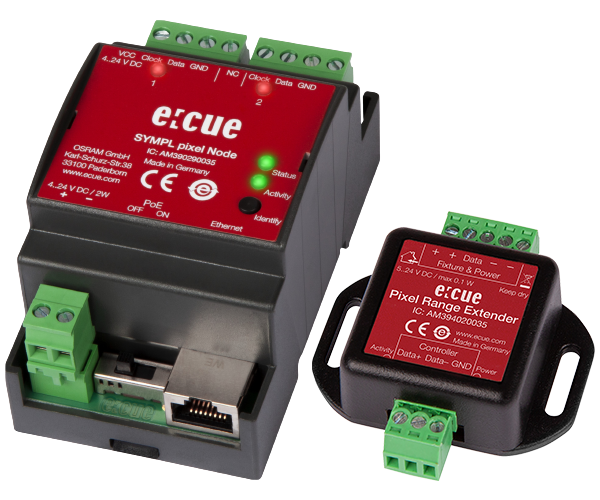
SYMPL pixel Node
& Pixel Range Extender

Installation Help

No error detected

If constantly on, the device is online. Server application is in operation.

If blinking in one second intervals, the device is offline, no connection to a SYMPHOLIGHT server or Core is available. If blinking more rapidly, the device is in bootloader mode.

Restart the system by disconnecting the power supply. If the error persists, contact Traxon e:cue Service.

Test mode active

Double-press the Identify button.

Identify via Sympholight.

No link

Link present

Network traffic

The device is off.

The device is online. Server application is in operation.

The device is offline, no connection to a SYMPHOLIGHT server or Core is available.

The device is in bootloader mode.

Restart the system by disconnecting the power supply. If the error persists, contact Traxon e:cue Service.

Identify via Sympholight.

No LED pixel protocol (type) defined.

Pre-configured asynchronous serial LED pixel protocols.

DMX512 protocol.

Pre-configured synchronous serial LED pixel protocols (except DMX).

Custom protocols.

A short press during operation in online mode sends an Identify message to the server. This allows the Node of the installation to be associated with the indicated Node in SYMPHOLIGHT.

Access the Test mode of the SYMPL Node by double-pressing the Identify button during operation. The Status / Test LED signals the Test mode with a blue color. The Test mode starts at the first pixel output with chasing lights (single run white, test pattern 1).

Exit the Test mode any time by fast double-pressing the Identify button again. The device proceeds to normal operation. The  Status / Test LED is no longer blue.

  • Note that testing via the Identify button always uses a block size of 3 channels (RGB → white). For LED fixtures with less or more than 3 channels, it is recommended to use the Test mode via web interface  where you can define the block size.
  • Note that the Test mode outputs the configured protocol type only.

Single-press the Identify button to switch between the following Test patterns:

  • Chasing lights (single run white, pattern 1).
  • All channels blink (pattern 2).
  • All channels at 100% (pattern 3).
  • All channels off (pattern 4).
  • Alternate between the individual pixel ports and the four test patterns. After the individual test of each pixel output, both pixel ports are tested simultaneously. Another short-press starts the test patterns from the beginning.

The default update way is using Sympholight.

Alternative option via bootloader:
Keep the Identify button pressed while powering up, Status and Activity LEDs light up at first. Bootloader mode is signaled by a fast blinking Status LED. Release the button now. The device stays in bootloader mode to download a new firmware.

To exit the bootloader mode, short press the Identify button again.

Keeping the button pressed further on, the device proceeds to normal operation. No changes apply.

Keep the Identify button pressed while powering up, until Status and Activity LEDs blink alternating, then blink together. Releasing the button now resets the device to its factory settings. The password and other settings are reset to their default values. 

Keeping the button pressed further on, the device proceeds to normal operation. No changes apply.

Each cable connected to the output ports should not exceed a length of 3 m. Use the Pixel Range Extender for cable length up to 300 m*.

Connect cables and data only when the device is powered down.

Supply the SYMPL Node with power after all cabling is completed.

2 x DMX/RDM

GND, DMX-, DMX+ left to right (perspective of the illustration).

It is recommended to use twisted pair cabling.

1 x e:net (Ethernet), RJ45, CAT5.

PoE capable: Set the PoE switch to “ON”. Connect an Ethernet connection from a power sourcing device.

  • Never connect more than one SYMPL Node in factory state to a network. The identical IP addresses will conflict and disturb proper communication.
  • The Ethernet port of the SYMPL Node is not designed for inter-building connections with power and lighting transients. Use only intra-building networks to connect the SYMPL Nodes and Cores.

The e:cue SYMPL pixel Node can be powered

  • via pass back power from the LED fixture, or
  • via Power-over-Ethernet (PoE): see e:net connection, or
  • by an external power supply (PSU):

24 V DC

V+, V- left to right (perspective of the illustration).

The SYMPL dmx Node is not suited for powering over a DC power supply network. The device must be supplied by a separate power supply that is certified according to the local regulations (e.g. SELV, Class 2).

Turn the power on when all cables are connected to the SYMPL dmx Node. The device starts operating. The device is in operation when the LED Status is flashing.

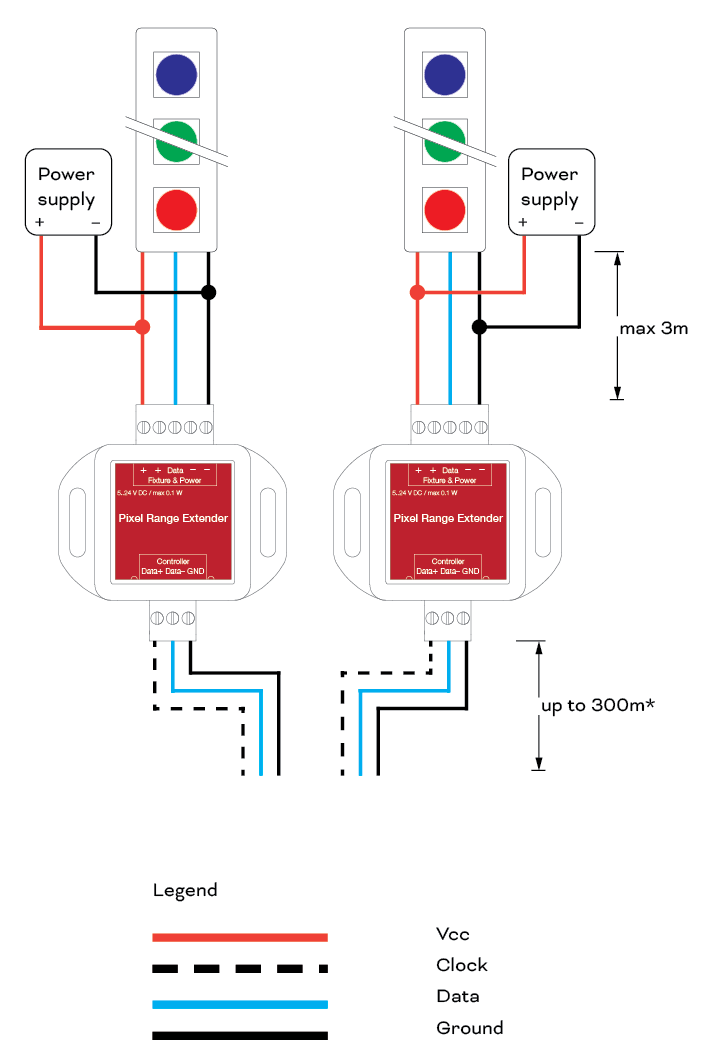
Use the Pixel Range Extender for cable length between the SYMPL pixel Node and the Range Extender / fixtures of up to 300 m*.

Use shielded and twisted pair cabling for data connections, like Cat 5e S*TP.

Use only intra-building networks. All ports of the Pixel Range Extender are not designed for inter-building connections.

For the Pixel Range Extender to work, you need to set the SYMPL pixel Node’s output mode to “extender mode” in the node’s web interface.

Data + , Data – , Ground left to right.

Connect the “Controller” interface of the Pixel Range Extender to the Pixel interface of a SYMPL pixel Node:
Connect “Data +” to “Clock”, “Data –” to “Data”, and “GND” to “GND” (Pixel Range Extender to SYMPL pixel Node).

V + , V + , Data , V – , V – left to right.

5…24 V DC / max 0.3 W.

On the “Fixture & Power” interface connect the Pixel Range Extender to the LED fixture using pins “+”, “Data”,
and “–”, and to the fixture’s PSU.

Mount the Pixel Range Extender with two slotted holes on walls or on any stable surface.

Recommended wiring:

The Node is supplied via PoE with power. Have PoE switched ON. 

PSU between PRE and fixture: Each fixture has a separate PSU. The PSU for the fixture also supplies the fixture’s PRE with power (+ and – pins, 5 .. 24 V DC). The PSU for the fixture supplies the fixture’s PRE with power via separate wires to the PRE (all 5 pins in use).


Dimensions (W x H x D) 53.5 x 90.5 x 62 mm / 2.1 x 3.6 x 2.4 in (excl. fastening clip)
Weight 100 g
Power Supply 5 … 24 V DC pass back power from Pixel Port 1 (e.g. from Pixel Strip)
or 5 … 24 V DC terminal plug, cross cable section: 0.2 – 3.3 sqmm
or PoE IEEE 802.3af on RJ45
Power Consumption 2 W
Operating Temperature 0 … 50 °C / 32 … 122 °F
Storage Temperature -10 … 70 °C / 14 … 158 °F
Electrical Safety SELV
Operating/Storage Hum. 0 … 80% non-condensing
Protection Class IP20
Installation Indoor installation only, intra building connections only
Housing Material Self extinguishing blend PC/ABS UL document E140692
Mounting on 35 mm DIN rail (EN 60715), 
or with key hole on any stable vertical surface
Certification CE, ETL, RoHS, FCC, UKCA
Interface 2 x DMX512/RDM,
individually isolated (1 kV)
3-pin terminal plug
Interface Specifications VDMXmax/VDMXmin = 4.8 V/0.8 V
Short circuit protected: ISCmax = 62 mA
Ethernet-Port 1 x e:net 10/100 Mbit/s, RJ45
User Interface LEDs for error, Ethernet activity, device status, DMX status, Identify button


Dimensions (W x H x D) 53.5 x 90.5 x 62 mm / 2.1 x 3.6 x 2.4 in (excl. fastening clip)
Weight 100 g
Power Supply 24 V DC (terminal plug)
or PoE IEEE 802.3af on RJ45
Power Consumption 2 W (incl. DMX termination)
Operating Temperature 0 … 50 °C / 32 … 122 °F
Storage Temperature -10 … 70 °C / 14 … 158 °F
Electrical Safety SELV
Operating/Storage Hum. 0 … 80% non-condensing
Protection Class IP20
Housing Material Self extinguishing blend PC/ABS UL document E140692
Mounting on 35 mm DIN rail (EN 60715), 3 units
or with key hole on any stable vertical surface
Certification CE, ETL, UKCA
Interface 2 x DMX512/RDM,
individually isolated (1 kV)
3-pin terminal plug
Interface Specifications VDMXmax/VDMXmin = 4.8 V/0.8 V
Short circuit protected: ISCmax = 62 mA
Ethernet-Port 1 x e:net 10/100 Mbit/s, RJ45
User Interface LEDs for error, Ethernet activity, device status, DMX status, Identify button


Mount in a vertical position. Terminals on top and bottom.

Indoor installation.

For mechanical stability, mounting on a 35 mm DIN rail (EN 60715) is recommended.

You can also mount the SYMPL Node on any flat vertical surface. Use 3 to 3.5 mm screws for the hanger hole.

Further assistance and contact:

[email protected]